Odoo 20 Is Here: Key New Features for Indian Businesses
By Nishant Patel, CTO, Peanut Square

Quick answer: Odoo 20 is out, and it brings big changes. AI agents can now create and update records instead of just suggesting. Accounting does more of the work for you. And the India localization picks up a long list of GST, TDS and payroll features. Below we go through what changed, using Odoo's own release notes, and what it means for businesses in India that already run Odoo or are thinking about it.
When was Odoo 20 released?
Odoo announced Odoo 20 on 24 September 2026 in its "Meet Odoo 20" post, and the official release notes are dated September 2026. Odoo 19 came out in September 2025, with an intermediate 19.1 release in January 2026.
AI agents and plain-language automation
AI is the biggest theme in this release. According to Odoo:
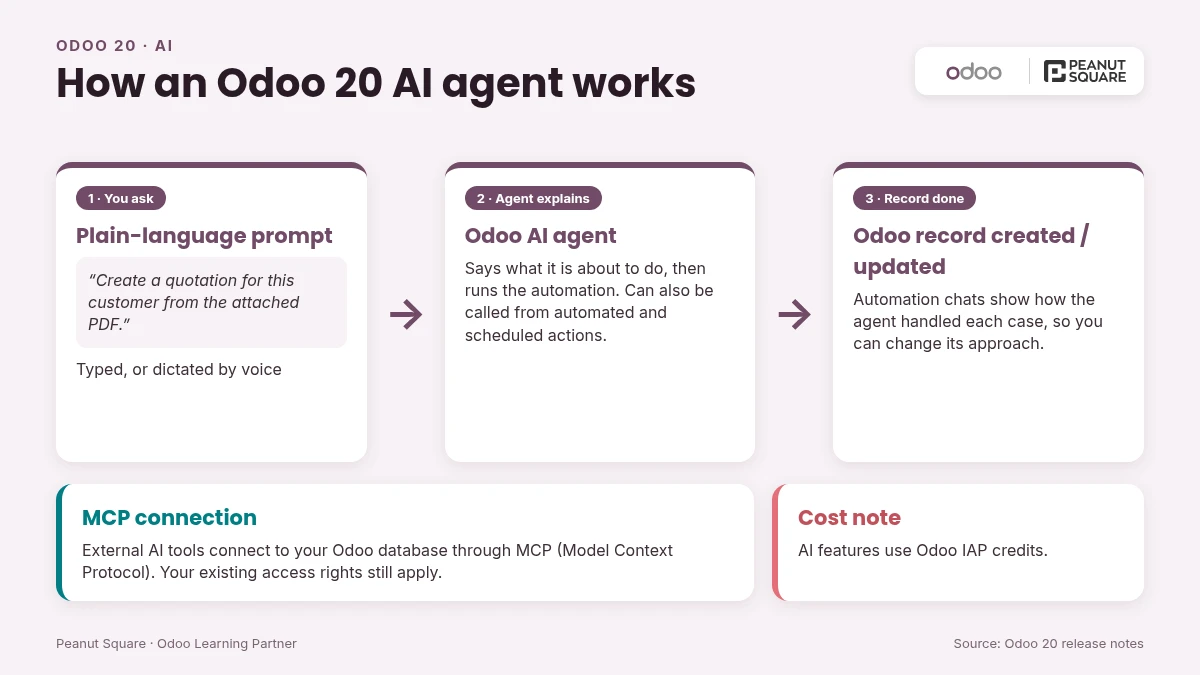
You can automate a process by telling an AI agent what to do in plain language. The agent explains what it is about to do, and then the automation runs on its own.
AI agents can now create and update records, including from an uploaded instruction file such as a PDF.
Automated and scheduled actions can call agents. Automation chats show how an agent handled each case, so you can ask it to change its approach.
External AI tools can connect to your database through MCP (Model Context Protocol), and your existing access rights still apply.
"Topics" are now called "skills", and you can dictate requests to an agent by voice.
Cost note: All AI features in Odoo 20 use credits bought through Odoo IAP, so add that running cost to your budget.
CRM, Discuss and Phone
CRM lead generation now draws on the Dun & Bradstreet company database (it used to be Clearbit). Leads can also come from website-visitor IP detection, Gmail/Outlook imports and business-card scanning.
A pipeline switcher lets you move between team pipelines, and each salesperson can be set to "Always in rotation", "In rotation with a limit" or "Out of rotation".
Discuss adds polls. Clients can join video calls from their browser without installing anything, and recorded calls are transcribed automatically.
Phone lets you build call flows that route calls by hours, location or team. Check that number purchasing is available in India before you rely on it.
Purchase, Inventory and Manufacturing
Odoo now suggests minimum and maximum stock levels for reordering rules from your demand history, and can draft the purchase order for you.
Vendor bills are matched to purchase orders automatically, and price or quantity differences are flagged clearly. You can also see each vendor's quality rating before you order.
Inventory gains CMR documents for road transport, a stock aging report, landed costs on individual products and better intercompany flows.
With continuous production, recording quantities on a work order releases the next one automatically. Manufacturing also gets a side-by-side Bill of Materials comparison, Gantt rescheduling with buffers and a colour-coded Kanban.
Website and eCommerce
Describe the page you want and Odoo builds it. The same works for promotions, events and product pages, and the AI agent can create missing snippets.
SEO and translation take one click. We still recommend a human review before anything goes live.
At checkout, customers can pick a preferred delivery date, track progress toward free shipping and choose Pay on Invoice. They can also request returns from their portal.
Accounting changes
An Accounting AI agent answers questions such as receivables or cash flow using your own report data.
When you enter a bill, Odoo suggests the product, account, tax and analytic distribution based on your bill history.
Parent accounts replace account groups for structuring the chart of accounts, and account codes become optional.
Payment statuses are renamed: "In Process" becomes "Paid" and "Paid" becomes "Reconciled". Train your finance team on this before go-live.
You can pay bills from inside Odoo through a payment initiation (PISP) interface. Check which banks and countries it supports before you plan around it in India.
India localization: GST, TDS and payroll
The India section of the Odoo 20 release notes includes:
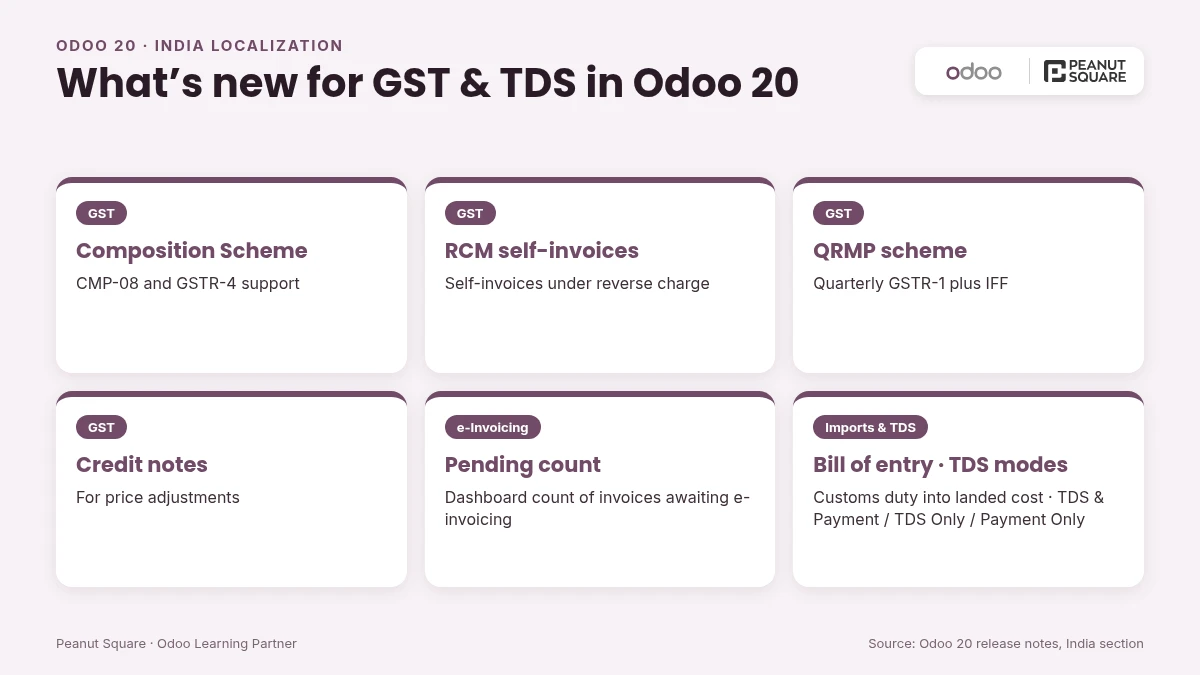
GST: Composition Scheme support with CMP-08 and GSTR-4, RCM self-invoices, the QRMP scheme (quarterly GSTR-1 plus IFF), credit notes for price adjustments, and a dashboard count of invoices still waiting for e-invoicing.
Imports and TDS: A bill of entry flow puts customs duty into inventory cost through landed costs. TDS can be applied as TDS & Payment, TDS Only or Payment Only.
Reporting: Financial statements in the Schedule III, Division I format of the Companies Act.
Payroll: Employee TDS declarations, a gratuity calculation report, an EPF summary, flexible sandwich-leave rules, monthly TDS challans, a Notice Period tab for full and final settlement, a salary configurator for offers, and HDFC eNET salary files.
Attendance: eSSL and Mantra biometric devices can send attendance records straight to Odoo.
These sit on top of features Odoo already documents for India: e-invoicing, e-way bills, the GSTIN status check, and GSTR-1, GSTR-2B and GSTR-3B reports.
Technical changes that affect upgrades
Access rights are simpler: record rules are removed and a domain now sits directly on the access right. Any custom module with its own security will need to be reviewed and retested.
Mail tracking values are removed. Tracking messages are now generated on the fly, and admins who still need tracking values can install a dedicated module.
Field Service is discontinued as a separate app. Its features now live in Planning.
Push notifications no longer use Firebase. Odoo now sends them with its own tools.
What should Indian businesses do next?
List your customizations and integrations. The access-rights change is where most of the upgrade effort will go.
Ask for a test upgrade through Odoo's official upgrade process and try your GST and payroll flows on the copy.
Choose which AI features to switch on, and set an IAP credit budget for them.
Plan training around the renamed payment statuses and any Field Service to Planning moves.
Agree on a go-live window that avoids GST filing dates.
How Peanut Square can help
Peanut Square is an Odoo Learning Partner based in Ahmedabad, Gujarat, founded in 2017. We have developed 90 Odoo modules and delivered 100+ projects, and our team includes an Odoo-certified consultant. We handle Odoo consulting, implementation, customization, migration and support. Our Odoo clients include Renite Vitrified (https://renitevitrified.com/), Woodleaf and Madhav Solar. If you are on Odoo 19 or earlier, we can review your customizations and plan your move to Odoo 20.
Book an Odoo 20 upgrade assessment: https://www.peanutsquare.com/odoo-migration
About the author: Nishant Patel, CTO, Peanut Square
Nishant leads technology at Peanut Square, an Odoo Learning Partner founded in 2017 and based in Ahmedabad, Gujarat. The team has developed 90 Odoo modules, delivered 100+ projects and includes an Odoo-certified consultant.
When was Odoo 20 released?
Odoo announced it on 24 September 2026. The official release notes are dated September 2026.
What is the biggest change in Odoo 20?
AI agents. They can now create and update records, run automations you describe in plain language, and connect to outside AI tools through MCP.
Do Odoo 20 AI features cost extra?
Yes. According to the release notes, all AI features now need credits bought through Odoo IAP.
What's new for GST in Odoo 20?
Composition Scheme returns (CMP-08 and GSTR-4), RCM self-invoices, QRMP support, credit notes for price adjustments and a count of invoices pending e-invoicing.
Should I upgrade to Odoo 20 right away?
It depends on how much you have customized. Run a test upgrade first, especially if you have custom modules, because Odoo 20 changes how access rights work.
Sources
Meet Odoo 20 (Odoo blog, 24 Sep 2026): https://www.odoo.com/blog/odoo-news-5/meet-odoo-20-2439
Odoo 20 release notes: https://www.odoo.com/odoo-20-release-notes
Odoo release notes index: https://www.odoo.com/page/release-notes
Odoo India localization docs: https://www.odoo.com/documentation/19.0/applications/finance/fiscal_localizations/india.html
Odoo upgrade documentation: https://www.odoo.com/documentation/19.0/administration/upgrade.html