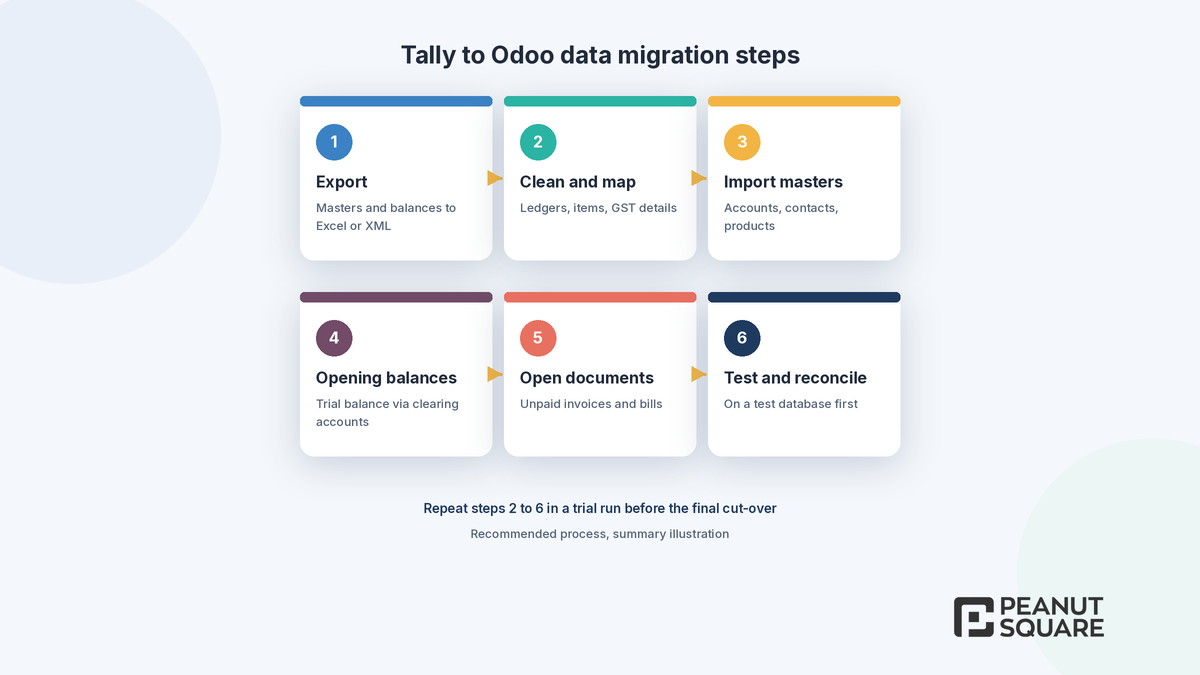
Quick answer: A Tally to Odoo migration has six steps: export masters and closing balances from Tally, clean and map them to Odoo's chart of accounts, contacts and products, import the masters, load opening balances through clearing accounts, import open invoices and bills, then test and reconcile on a test database before go-live. Cut over at the end of a financial year or tax period, set up GST in Odoo first, and avoid moving years of old vouchers.
Many Indian businesses start on Tally and later want one system for sales, purchase, inventory, manufacturing, accounting and their website. Odoo can be that system, but the move is an accounting project first and a software project second. This Tally to Odoo migration guide covers what data to move, how to handle opening balances and GST, how to run a parallel check, and the pitfalls we see teams plan for. Odoo steps come from the official Odoo 20.0 documentation; Tally export details come from Tally's own help site. Both are linked at the end.
Why businesses move from Tally to Odoo
The usual reason is not that accounting stops working. It is that the rest of the business has outgrown spreadsheets around it. Typical triggers include:
Sales, purchase and stock teams working in separate tools and re-keying data into accounts.
A need for CRM, eCommerce, manufacturing or a customer portal linked to the same records.
Multiple branches, warehouses or companies that need shared masters and approvals.
Custom workflows that need an extendable platform, which is where Odoo customization comes in.
Teams searching for a Tally ERP alternative should still be honest about scope. If your only need is bookkeeping and GST filing, a migration may not be worth the effort. Be clear on the business case before you start.
What data should you migrate from Tally to Odoo?
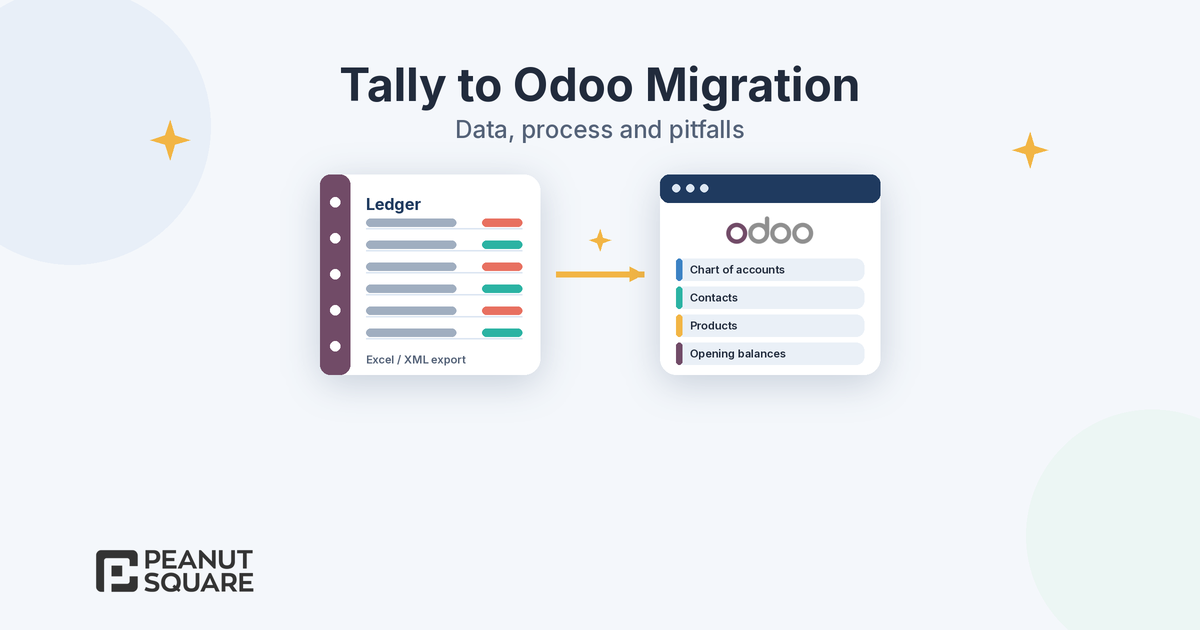
Move what you need to run the business from day one, not your full history. So how do you migrate from Tally to Odoo without carrying old clutter? A practical Tally to Odoo migration scope looks like this:
Groups and ledgers
Where it goes in Odoo: Chart of accounts (Odoo 20 uses parent accounts to structure it)
Migrate? Yes, after mapping
Sundry debtors and creditors ledgers
Where it goes in Odoo: Contacts (customers and vendors) with GSTIN and GST treatment
Migrate? Yes
Stock groups, stock items, units
Where it goes in Odoo: Product categories, products, units of measure
Migrate? Yes, categories first
Godowns
Where it goes in Odoo: Warehouses and locations
Migrate? Yes, if you use Inventory
Cost centres
Where it goes in Odoo: Analytic accounts
Migrate? If used for reporting
Closing balances
Where it goes in Odoo: Opening entry (trial balance)
Migrate? Yes
Unpaid sales and purchase vouchers
Where it goes in Odoo: Open customer invoices and vendor bills
Migrate? Yes, total amount due only
Closing stock
Where it goes in Odoo: Opening inventory count with product cost
Migrate? Yes
Years of paid vouchers
Where it goes in Odoo: Keep in Tally as a read-only archive
Migrate? Usually no
This mapping is a starting point; confirm it with your accountant. On the Tally side, Tally's help site explains that TallyPrime can export masters, transactions and reports in formats including Excel (.xlsx) and XML, can include dependent masters, and offers an option to export closing balances as opening balances. Tally also advises taking a backup before you export.
On the Odoo side, the import tool accepts .xlsx and .csv files on almost any record type, including contacts, products and journal entries. Odoo's documentation recommends downloading the import template, using the Test button before Import, keeping the External ID column for later updates, and importing large files in smaller batches to avoid time-outs. Import product categories before products.
When should you cut over, and how do you load opening balances?
Odoo's Accounting "Get started" documentation lists three options for when to switch:
End of the fiscal year: the easiest option, because it minimises the data you need to transfer.
End of a tax period: you can post all entries from the past period or only each account's closing balance.
Middle of a tax period: not recommended, because the tax return must combine data from two systems.
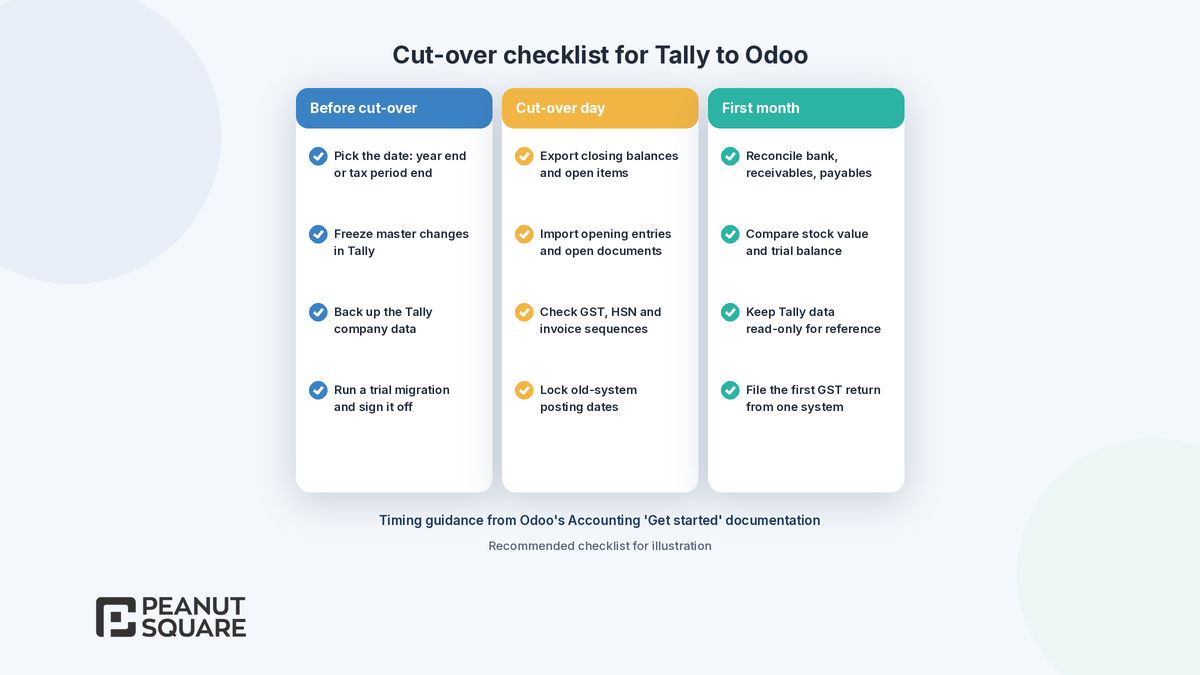
For most Indian companies that means 1 April or the start of a GST return period. Prepare four things from Tally: opening account balances, open invoices and credit notes, open vendor bills and refunds, and the opening inventory count.
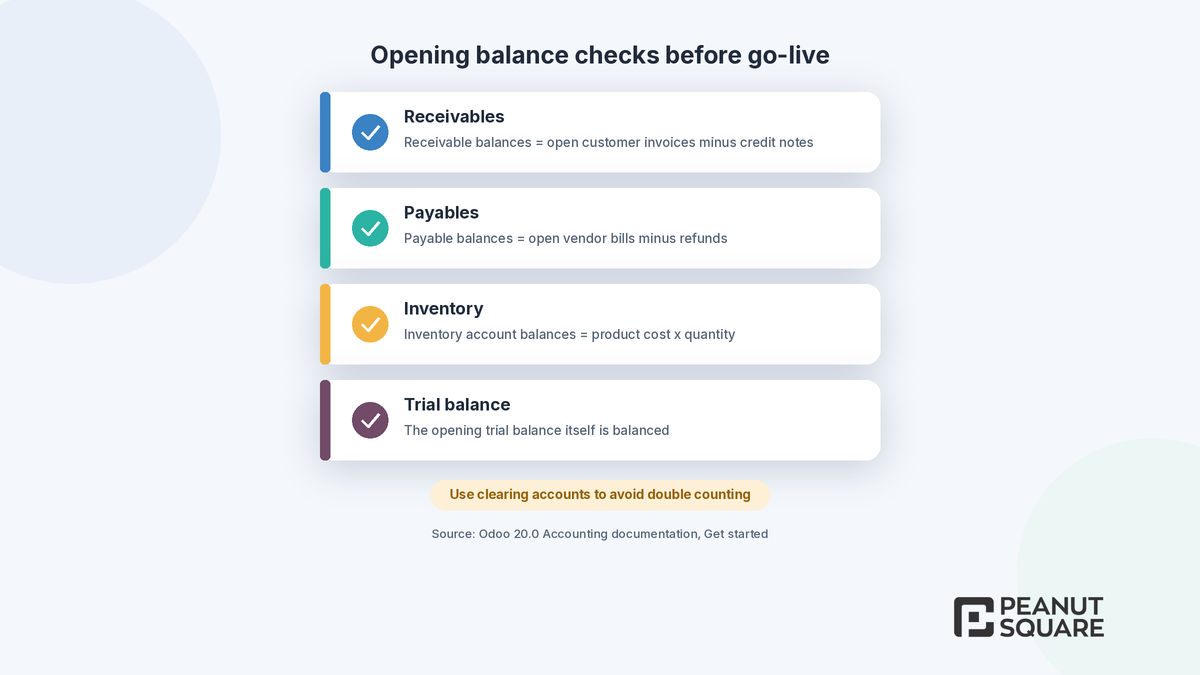
The biggest trap is double counting. Odoo's documentation gives the example of a receivable balance of 1,000 plus open invoices of 1,000 showing as 2,000 if both are created without care. Its answer is to use clearing accounts, which hold the value temporarily until it is balanced. It also recommends importing each open invoice or bill with only the total amount due, not every line, to avoid tax accounts being hit twice.
Before posting opening entries, Odoo says your data must pass four checks:
Receivable balances equal open customer invoices minus credit notes.
Payable balances equal open vendor bills minus refunds.
Inventory account balances equal product cost multiplied by quantity, summed for all products.
The opening trial balance itself is balanced.
Set the starting balance on each bank journal's first statement so it matches the real bank balance. In Odoo 20, journal entries that affect bank accounts must originate from bank transactions, so do not post bank opening balances as a manual journal entry.
How do you set up GST in Odoo after Tally?
Set up GST before you import a single invoice. According to the Odoo 20.0 India documentation:
Install the Indian localization modules (accounting, e-invoicing, e-way bill and GST reports) and enter the company's PAN and GSTIN.
Under the Indian Integration settings, configure options such as TDS/TCS, Registered Under GST, E-Invoicing, E-Way bill and GST E-Filing & Matching for GSTR-1 and GSTR-2B. E-invoicing and e-way bill need API users created on the government portals.
Set the GST Treatment on each contact and HSN/SAC codes on products. Odoo flags invalid HSN codes when preparing GST returns: product codes must not begin with 99, and service codes must.
Odoo 20 adds more Indian accounting support, including Composition Scheme returns (CMP-08 and GSTR-4), quarterly GSTR-1 under QRMP, flexible TDS handling and Schedule III financial statements. Read our Odoo 20 India localization guide and Odoo 20 Accounting for details.
Parallel run and reconciliation
A parallel run is the safety net of any Tally to Odoo migration. Odoo recommends practising the process in a test database and working in parallel with your prior accounting workflows in case there are issues. In practice:
Do at least one full trial migration and have your accountant sign off the opening trial balance.
For the first month, reconcile bank statements, receivables and payables in Odoo, and compare the trial balance and stock value with Tally.
File GST returns from one system only for any given period.
After sign-off, use Odoo's lock dates so no one changes the opening period by mistake.
Common Tally to Odoo migration pitfalls
Whether you migrate Tally to Odoo yourself or with a partner, these are the issues to plan for in any Odoo data migration in India:
Migrating 10 years of vouchers. It is slow, error-prone and rarely needed. Bring balances and open items; keep Tally as an archive.
Duplicate ledgers. The same customer under two names becomes two contacts. Clean masters before export.
Mid-period cut-over. Splitting a GST period across two systems complicates filing.
Double counting receivables or payables. Use clearing accounts and run Odoo's four checks.
Missing GST data. Wrong GSTIN, GST treatment or HSN codes break e-invoices and returns.
Invoice numbering. Odoo requires that an imported invoice number does not already exist in the journal, so plan sequences.
No owner. Name one person from accounts who signs off each step.
How Peanut Square can help
Peanut Square is an Odoo Learning Partner based in Ahmedabad, Gujarat, founded in 2017. We have developed 90 Odoo modules and delivered 100+ projects, and our team includes an Odoo-certified consultant. Our Odoo clients include Renite Vitrified, Woodleaf and Madhav Solar. Through our Odoo development and Odoo implementation services, we can help map your Tally data, build import files, run trial migrations and support your accountant through cut-over. If you are still choosing an implementation team, read how to choose an Odoo implementation team near you.
Planning a move from Tally? Talk to us: https://www.peanutsquare.com/en/contact
About the author: Nishant Patel, CTO, Peanut Square
Nishant leads technology at Peanut Square, an Odoo Learning Partner founded in 2017 and based in Ahmedabad, Gujarat. The team has developed 90 Odoo modules, delivered 100+ projects and includes an Odoo-certified consultant.
Sources
Odoo 20.0 documentation, Accounting: Get started (transition, opening entries, clearing accounts): https://www.odoo.com/documentation/20.0/applications/finance/accounting/get_started.html
Odoo 20.0 documentation, Export and import data: https://www.odoo.com/documentation/20.0/applications/essentials/export_import_data.html
Odoo 20.0 documentation, India fiscal localization: https://www.odoo.com/documentation/20.0/applications/finance/fiscal_localizations/india.html
Odoo 20.0 documentation, Year-end closing and lock dates: https://www.odoo.com/documentation/20.0/applications/finance/accounting/reporting/year_end.html
Odoo 20.0 documentation, Bank reconciliation: https://www.odoo.com/documentation/20.0/applications/finance/accounting/bank/reconciliation.html
Odoo 20 release notes (Accounting, India): https://www.odoo.com/odoo-20-release-notes
TallyPrime Help, Export data: https://help.tallysolutions.com/export-data-in-tally/
How do you migrate from Tally to Odoo?
Export masters and closing balances from Tally, clean and map them to Odoo's chart of accounts, contacts and products, import the masters, load opening balances through clearing accounts, import open invoices and bills, then test and reconcile on a test database. Cut over at the end of a financial year or tax period, with GST configured in Odoo first.
Should I migrate all my old Tally vouchers to Odoo?
Usually not. Moving years of paid vouchers is slow and error-prone. Most companies migrate masters, closing balances as an opening entry, open invoices and bills, and opening stock, then keep the Tally data as a read-only archive for reference and audits.
When is the best time to switch from Tally to Odoo?
Odoo's documentation says the easiest time is the end of the fiscal year, which for most Indian companies is 31 March. The end of a tax period also works. Switching in the middle of a tax period is not recommended, because the tax return would need data from both systems.
How do I avoid double counting opening balances in Odoo?
Use clearing accounts, as Odoo's documentation recommends, and import each open invoice or bill with only the total amount due. Before posting, check that receivables equal open invoices minus credit notes, payables equal open bills minus refunds, inventory accounts equal stock value, and the trial balance is balanced.
Does Odoo handle GST after migrating from Tally?
Yes. Odoo's Indian localization covers GST taxes, e-invoicing, e-way bills and GST return reports such as GSTR-1, GSTR-2B matching and GSTR-3B. You enter the company PAN and GSTIN, set GST treatment on contacts and HSN codes on products, and create API users on the government portals for e-invoicing and e-way bills.