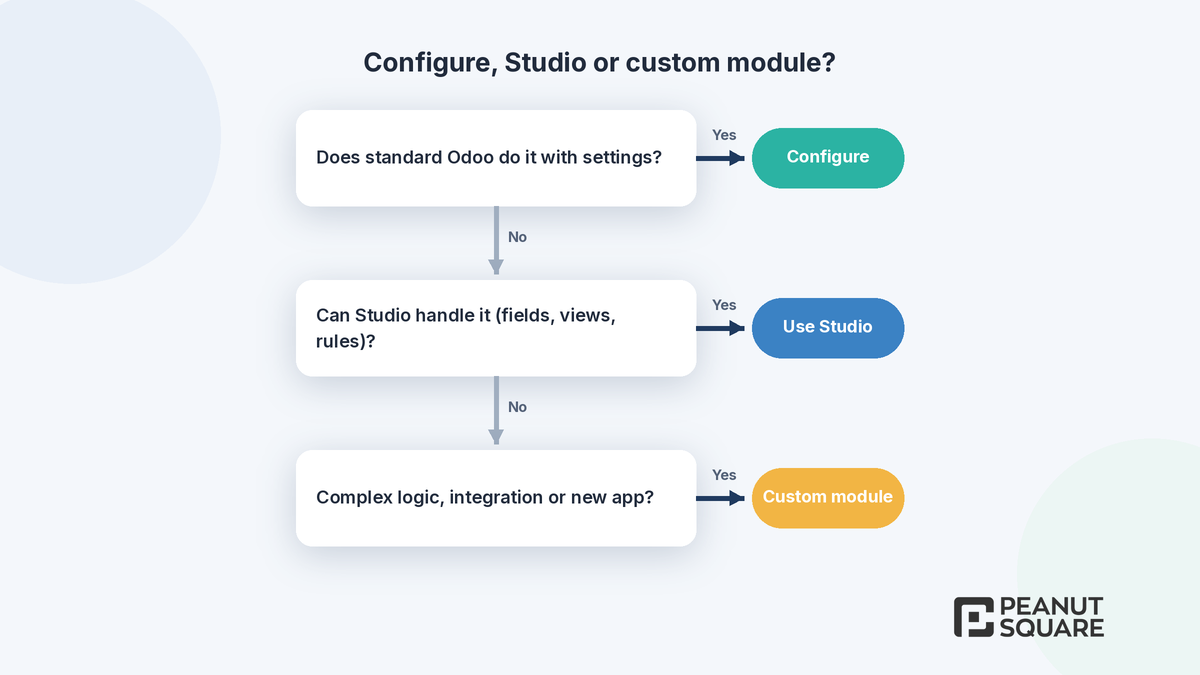
Quick answer: Odoo custom module development makes sense only when standard configuration and Studio can't meet a real business need. Typical reasons are complex business logic, integrations with other systems, or a process Odoo doesn't cover at all. Configure first, use Studio for fields, views and simple automation rules, and write code last. Custom code has to be maintained and upgraded by whoever maintains it, so every module should earn its place.
Start with standard Odoo
Odoo's own developer tutorial makes the point: before you develop a new module, it is good practice to check whether Odoo already answers the business case. Many requests that sound custom turn out to be settings, such as routes and reordering rules in Inventory, approval steps, pricelists, or the India localization options for GST and TDS. Each new Odoo version also adds features, so a module written for an older version may no longer be needed after an upgrade.
Map the process end to end before you decide anything is a gap.
Try the standard flow in a test database with real examples.
Check the release notes for your target version. The Odoo 20 new features list is a good place to start.
What can Studio do, and where does it stop?
Odoo's documentation describes Studio as a toolbox for customizing Odoo without coding knowledge. In any app you can add or change fields, views, models, automation rules, webhooks, PDF reports, approval rules and security rules, and you can even build a simple app from scratch. Odoo 20 adds more, including triggering activity plans from automation rules, reordering form buttons and tabs, and a new PDF report editor.
Two practical points from Odoo's documentation:
Plan impact: installing Studio on a database on the Standard pricing plan automatically triggers an upsell to the Custom plan.
Upgrades: Odoo's upgrade service covers customizations made with Studio, as long as Studio is still installed and the subscription is active.
Studio is a good fit for structure and simple rules. It is not designed for complex calculations, heavy integrations or logic that has to be tested like software.
Signs you need a custom module
Complex business logic: pricing, costing, scheduling or compliance rules that go beyond fields and simple conditions.
Integrations: two-way sync with machines, portals, marketplaces, banks or legacy systems.
A new business area: Odoo's tutorial uses a real estate advertisement app as its example of a business area not covered by standard modules.
Performance or volume: batch jobs and imports that need code-level control.
Reuse: the same behaviour across several companies or databases, packaged once.
AI tools with rules: in Odoo 20, AI server actions call tools that run Python code, and Odoo's documentation says tools must enforce business rules in that code. See our Odoo AI agents explainer.
What does a custom Odoo module look like?
A module is a Python package that Odoo recognises through a manifest file called __manifest__.py. The manifest contains a single dictionary with metadata such as the name, version, dependencies, data files and licence. If you don't set a licence, it defaults to LGPL-3.
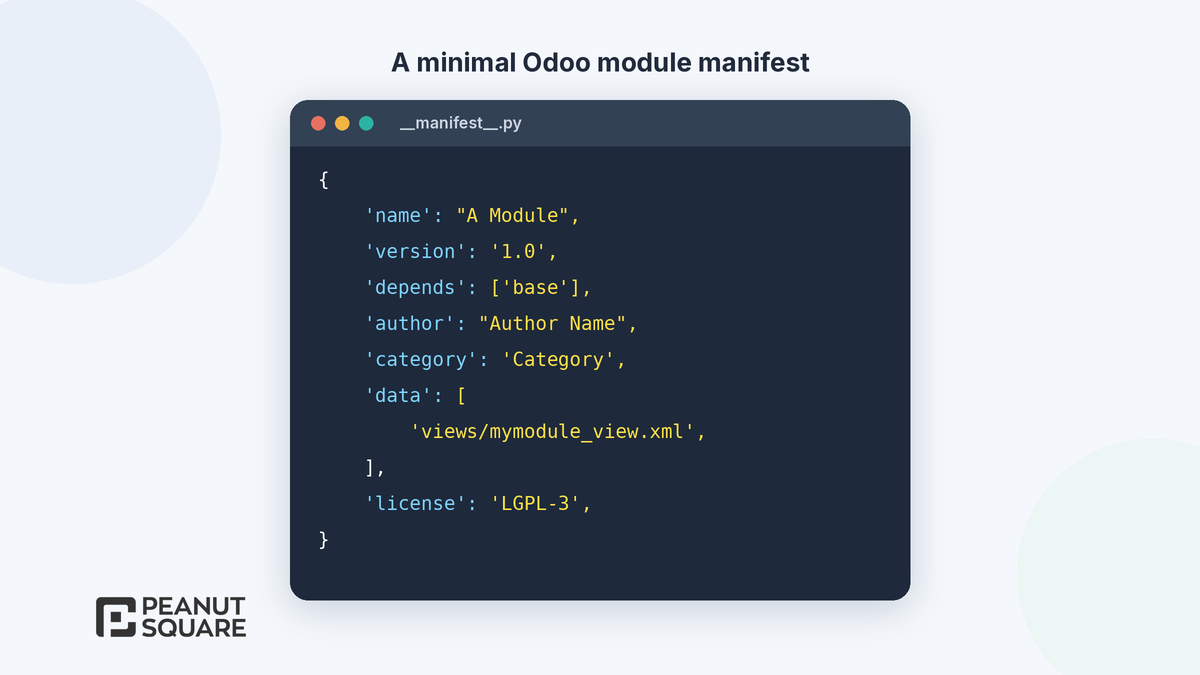
Behind the manifest sit models (Python), views and security (XML and CSV), and tests. Good modules depend on as few other modules as possible, inherit standard behaviour instead of copying it, and keep data files tidy.
Upgrade and maintenance cost of custom code
Here Odoo's upgrade documentation is very direct:
A database with custom modules can't be upgraded until a version of those modules exists for the target Odoo version.
If a new version breaks a customization, making it compatible is the responsibility of whoever maintains the custom module.
Odoo's upgrade SLA does not cover additional modules created in-house or by third parties, including Odoo partners, unless they are covered by a maintenance-of-customizations subscription.
Each major version is supported for three years, so plan for regular upgrades.
In practice, every custom module needs an owner, tests and an upgrade plan. Odoo 20 is a good example: it replaces record rules with a domain on each access right, so any custom module with its own security needs reviewing.
Build vs configure: a quick comparison
Configuration
The fastest option to change, and Odoo upgrades it with the standard apps. You are limited to what standard Odoo offers.
Studio
No code needed, and upgrades are covered while Studio is installed and the subscription is active. It is limited for complex logic, so check the effect on your pricing plan.
Custom module
Full flexibility and code you can test properly, but you or your partner must maintain it and upgrade it for every new version.
How we scope Odoo custom module development
Fit-gap first: we mark each requirement as standard, configuration, Studio or custom.
Write the gap down: inputs, outputs, rules, users and edge cases, agreed before coding.
Design for upgrades: inherit, don't copy, and keep each module small and focused.
Test: automated tests where logic matters, plus user acceptance testing with real data.
Hand over: documentation, source code access and a maintenance plan.
Peanut Square is an Odoo Learning Partner founded in 2017 in Ahmedabad, Gujarat. We have developed 90 Odoo modules and delivered 100+ projects, and our team includes an Odoo-certified consultant. Our Odoo clients include Renite Vitrified (https://renitevitrified.com/), Woodleaf and Madhav Solar. See our Odoo customization services. If you are comparing providers, our 12-point Odoo partner checklist can help.
Discuss a custom module: https://www.peanutsquare.com/en/odoo-development
About the author: Nishant Patel, CTO, Peanut Square
Nishant leads technology at Peanut Square, an Odoo Learning Partner founded in 2017 and based in Ahmedabad, Gujarat. The team has developed 90 Odoo modules, delivered 100+ projects and includes an Odoo-certified consultant.
Sources
Odoo 20.0 documentation, Studio: https://www.odoo.com/documentation/20.0/applications/studio.html
Odoo 20.0 documentation, Module manifests: https://www.odoo.com/documentation/20.0/developer/reference/backend/module.html
Odoo 20.0 developer tutorial, A New Application: https://www.odoo.com/documentation/20.0/developer/tutorials/server_framework_101/02_newapp.html
Odoo 20.0 documentation, Upgrade: https://www.odoo.com/documentation/20.0/administration/upgrade.html
Odoo 20.0 documentation, AI server actions: https://www.odoo.com/documentation/20.0/applications/productivity/ai/server-actions.html
Odoo 20 release notes (Studio and technical sections): https://www.odoo.com/odoo-20-release-notes
When should I build a custom Odoo module?
When standard configuration and Studio cannot meet a real need, for example complex business logic, integrations with other systems, high-volume processing or a business area Odoo does not cover. Check standard Odoo first, as Odoo's own developer tutorial recommends.
What can Odoo Studio do without code?
According to Odoo's documentation, Studio can add or modify fields, views, models, automation rules, webhooks, PDF reports, approval rules and security rules, and can build simple apps from scratch.
Are custom modules upgraded by Odoo?
Not automatically. Odoo's upgrade documentation says custom modules must be made compatible by their maintainer, and modules created in-house or by third parties, including partners, are not covered by the upgrade SLA unless covered by a maintenance-of-customizations subscription.
Does using Studio affect my Odoo plan?
Yes. Odoo's documentation says installing Studio on a database on the Standard pricing plan triggers an upsell to the Custom pricing plan. Studio customizations are covered by upgrades while Studio stays installed and the subscription is active.
What is in an Odoo module manifest?
A file called __manifest__.py containing a Python dictionary with module metadata such as name, version, depends, data files and license. The license defaults to LGPL-3 if not set.