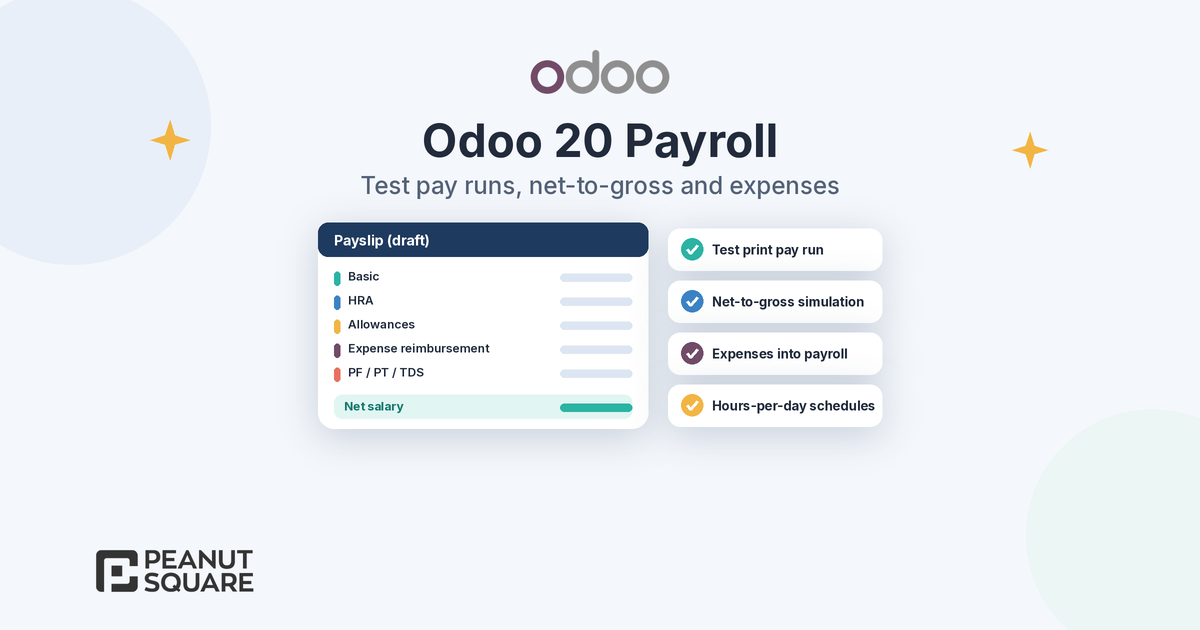
Quick answer: Odoo 20 payroll adds a redesigned dashboard that highlights setup warnings, one-click test printing of a pay run before you validate it, a clearer step-by-step pay run workflow, working schedules defined by hours per day, net-to-gross salary simulation, and salary rules on expense products so expenses flow into payroll. For India, the release notes add TDS declarations, a gratuity report, an EPF summary, TDS challans and an HDFC payment file.
Odoo 20 was announced in September 2026, and the Meet Odoo 20 announcement groups the payroll changes under one heading: more flexibility in Payroll. This guide explains what changed in Odoo 20 payroll for HR and accounts teams, with a separate section for Odoo payroll India users. Every feature below comes from Odoo's official release notes, the Meet Odoo 20 post or the Odoo 20.0 documentation, all linked at the end. Use it as a checklist for planning and testing, not as a description of how your own database will behave after an upgrade.
What changed in Odoo 20 payroll?
The general Payroll section of the Odoo 20 release notes lists these changes:
Dashboard: revamped to focus on warnings for setup and day-to-day control of pay.
Test print pay runs: test a pay run in one click with printed payslips.
Pay run workflow: a clearer, step-by-step process for creating and validating pay runs, with the chatter now enabled on pay runs.
Payslip sending options: choose whether payslips are sent to employees on confirmation, on payment or manually.
Working schedules: define a time per day without specifying start and end times.
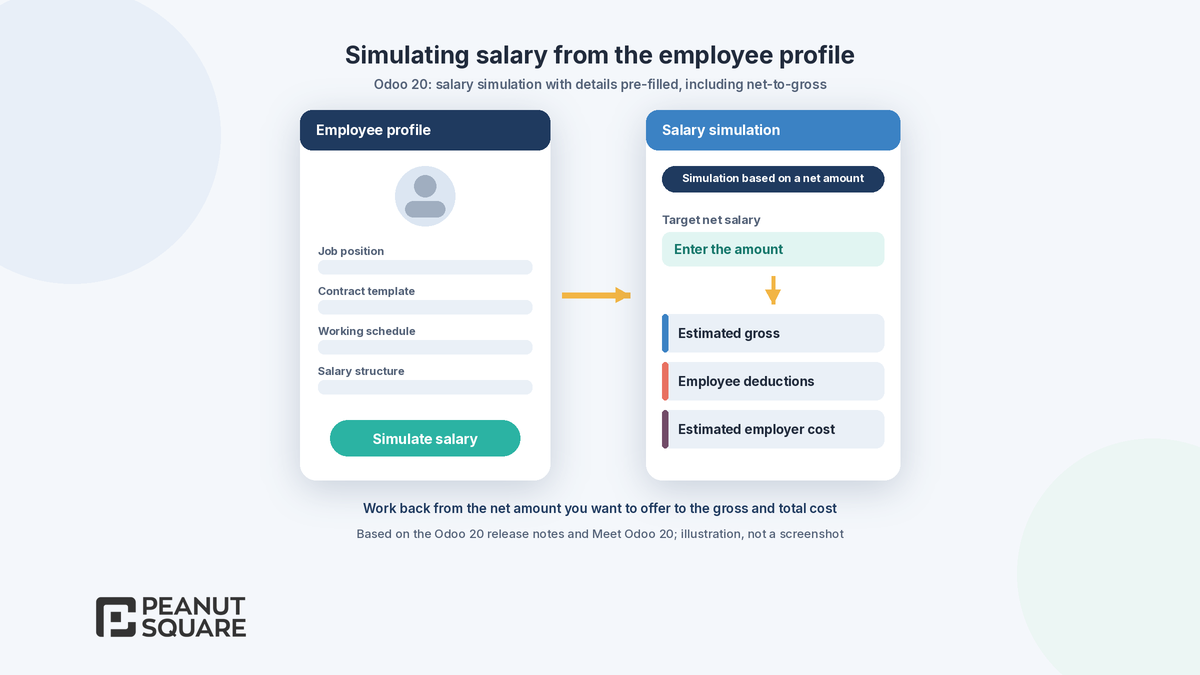
Net to gross simulation: perform a salary simulation based on a net amount.
Salary rules: a rule can now belong to multiple categories and be used in multiple structures, and expense products can be assigned a salary rule.
Salary indexation: increase an employee's salary by a percentage and/or a fixed amount.
Payslip UX: the Salary Computation tab shows only relevant information.
Two changes need special attention before an upgrade. Odoo now blocks changes to an employee's contract dates if they affect existing payslips; you must revert those payslips first. And the release notes say work entries and the Planning-Payroll integration have been removed, with work entry types and time off types merged. If your current pay process depends on work entries or Planning, test it carefully on a copy of your database.
Redesigned payroll dashboard
The Payroll dashboard in Odoo 20 is built around warnings. Odoo's announcement says the redesigned dashboard "highlights setup warnings before they become problems", and the release notes describe it as focused on setup and day-to-day control of pay. In practice, this is the first screen a payroll officer should check each month, before creating the pay run, so that missing setup is fixed before payslips are computed rather than after employees spot an error.
How do you test a pay run before validating it?
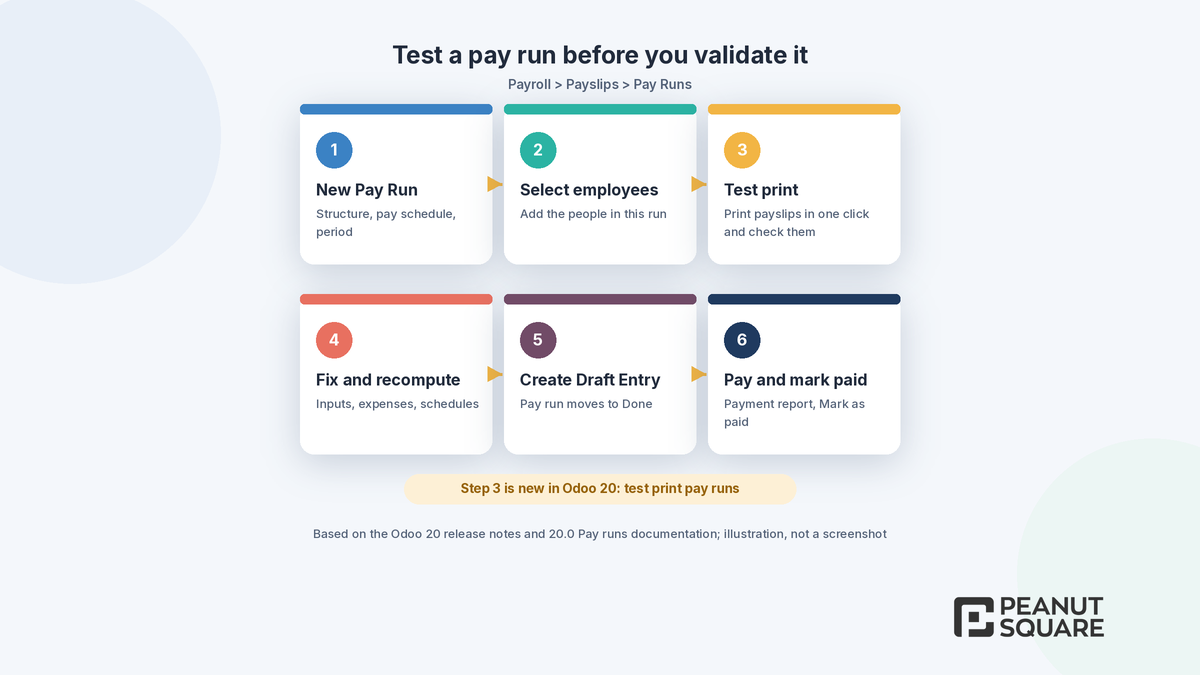
Odoo 20 lets you test a pay run in one click with printed payslips. Combined with the enhanced pay run workflow, a typical monthly run looks like this, based on the 20.0 Pay runs documentation:
Go to Payroll > Payslips > Pay Runs and click New. Choose the salary structure, the pay schedule (for example month) and the first day of the period.
Select the employees to include and confirm.
Use the test print to print the payslips and check them before anything is validated.
Fix missing inputs, expenses or schedules, then recompute.
Click Create Draft Entry; the pay run status changes to Done. A Revert button takes it back to Ready if you need more changes, unless a payslip is already paid.
Generate the payment report, then click Mark as paid.
With the chatter now on pay runs, reviewers in HR and accounts can comment on the run itself instead of in separate emails. Decide early when payslips go to employees: Odoo 20 lets you send them on confirmation, on payment or manually.
Hours-per-day schedules
Working schedules tell Payroll how much an employee is expected to work. In Odoo 20, you can use the updated working schedules to define a time per day without specifying start and end times. Meet Odoo 20 describes it as defining working schedules "by hours per day instead of start and end times". This suits staff with a fixed daily hour count but no fixed shift, such as field sales or office staff on flexible timing. The Employees app also gains variable working schedules defined from a calendar mode, for periods of variable work time.
Net-to-gross estimation
Hiring conversations in India often start with a take-home figure. Odoo 20 payroll adds a net to gross option to Odoo salary simulation, so you can perform a salary simulation based on a net amount. Meet Odoo 20 says you can "work backwards from a target net salary to estimate total cost". The Employees section of the release notes adds that you can simulate an employee's salary through their profile, with all necessary information pre-filled.
Use these simulations as estimates for offers and budgets. The final figures still depend on the salary structure, the rule parameters in your payroll localization and the employee's own details, so confirm the numbers with your accountant before you share them with a candidate.
Expenses into payroll
Meet Odoo 20 says "expenses now feed directly into payroll". The detail in the release notes is that expense products can now be assigned the appropriate salary rule, so that each type of expense is calculated correctly on the payslip. The Expenses app also gains expense limits per job position, where managers can cap an expense at the authorised limit before final approval, and a consolidated report to print several expenses at once.
Before you rely on this, agree with your accountant which expense types should be reimbursed through the payslip and which through a separate payment, and map each expense product to the right salary rule on a test database.
India payroll additions
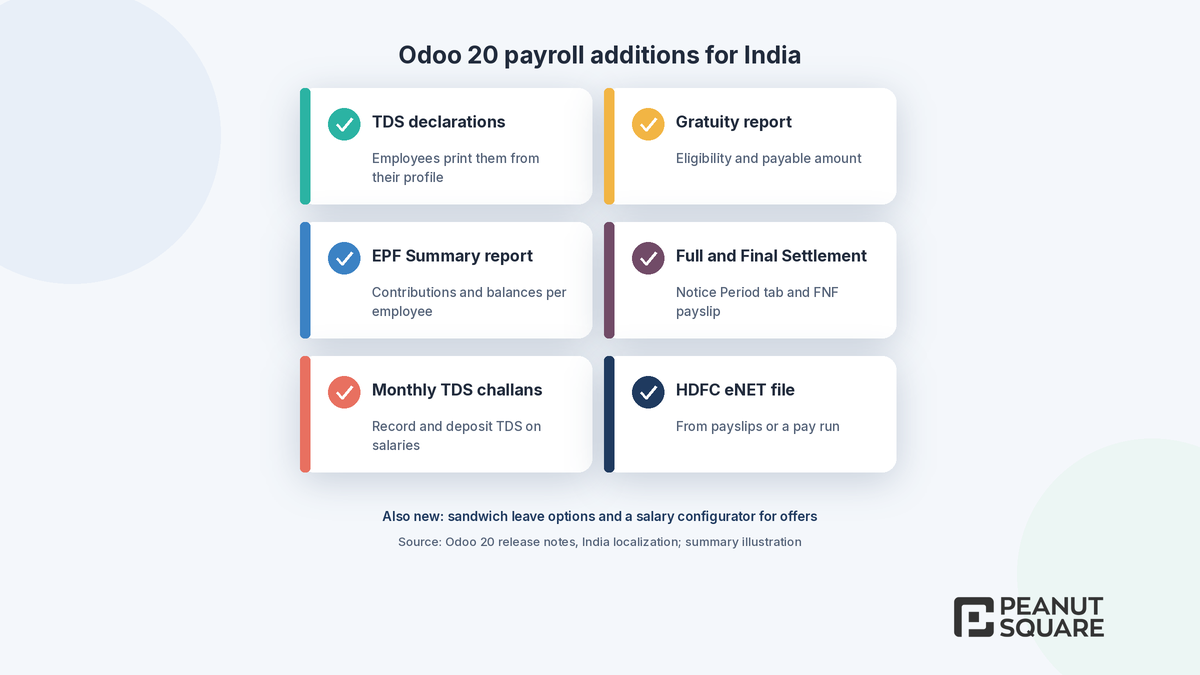
The India section of the Odoo 20 release notes lists these payroll additions:
Employees can generate and print their TDS declarations from their employee profile.
A Gratuity Calculation Report shows each employee's gratuity eligibility and, if relevant, the payable amount.
A new EPF Summary report gives an overview of each employee's EPF contributions and balances.
The End of collaboration wizard gets a Notice Period tab, and when the dismissal date and departure date are the same, the Full and Final Settlement (FNF) payslip can be generated directly.
TDS challans can be generated monthly to record and deposit TDS deducted from salaries, with quarterly reporting of the TDS deducted and deposited.
A salary configurator lets applicants select benefits while signing the offer.
An HDFC eNET file can be generated from individual payslips or a pay run and uploaded to the HDFC bank portal.
Flexible sandwich leave options decide whether weekends, company holidays or both count when leave spans non-working days.
These sit on top of the India payroll localization described in the 20.0 documentation. It provides the India: Regular Pay salary structure, settings for Employee Provident Fund, Professional Tax, Employee State Insurance and Labour Welfare Fund, PF calculated either on Basic capped at ₹15,000 or on actual Basic, and reports such as the Salary Register, EPF Report, ESI Report and Labour Welfare Fund Report. For the accounting and GST side of the release, see our guide to Odoo 20 India localization.
How should you plan an Odoo 20 payroll upgrade?
List the payroll features you actually use today, including any custom salary rules, reports or bank files.
Check whether your process depends on work entries or the Planning-Payroll integration, which the release notes say have been removed.
Upgrade a copy of your database first and run last month's payroll on it. Compare each Odoo payslip line with the payslip from your current system.
Test the new pieces: test print pay runs, payslip sending options, net-to-gross simulation and expense salary rules.
For India, check PF, ESIC, PT, LWF and TDS on a few employees with different salary levels before go-live.
Our Odoo migration service covers test upgrades like this, and Odoo support helps after go-live. For the wider release, read Odoo 20 new features and our guide to Odoo 20 POS.
How Peanut Square can help
Peanut Square is an Odoo Learning Partner based in Ahmedabad, Gujarat, founded in 2017. We have developed 90 Odoo modules and delivered 100+ projects, and our team includes an Odoo-certified consultant. Our Odoo clients include Renite Vitrified, Woodleaf and Madhav Solar. We can help you map your salary structures and expense types to Odoo, set up a test database, compare payslips with your current system and plan training for your HR and accounts teams.
Planning payroll on Odoo 20? Talk to us: https://www.peanutsquare.com/en/contact
About the author: Nishant Patel, CTO, Peanut Square
Nishant leads technology at Peanut Square, an Odoo Learning Partner founded in 2017 and based in Ahmedabad, Gujarat. The team has developed 90 Odoo modules, delivered 100+ projects and includes an Odoo-certified consultant.
Sources
Odoo 20 release notes (Payroll, Employees, Expenses and India sections): https://www.odoo.com/odoo-20-release-notes
Odoo blog, Meet Odoo 20: https://www.odoo.com/blog/odoo-news-5/meet-odoo-20-2439
Odoo 20.0 documentation, Payroll: https://www.odoo.com/documentation/20.0/applications/hr/payroll.html
Odoo 20.0 documentation, Pay runs: https://www.odoo.com/documentation/20.0/applications/hr/payroll/pay_runs.html
Odoo 20.0 documentation, Working schedules: https://www.odoo.com/documentation/20.0/applications/hr/payroll/working_schedules.html
Odoo 20.0 documentation, India payroll localization: https://www.odoo.com/documentation/20.0/applications/hr/payroll/payroll_localizations/india.html
Frequently asked questions
What changed in Odoo 20 Payroll?
According to the Odoo 20 release notes, Payroll gets a dashboard focused on setup warnings, one-click test printing of a pay run, a clearer step-by-step pay run workflow with chatter, payslip sending options, working schedules defined by hours per day, net-to-gross salary simulation, salary rules that can belong to several categories and structures, salary indexation and salary rules on expense products.
Can I test a pay run before validating it in Odoo 20?
Yes. The Odoo 20 release notes say you can test a pay run in one click with printed payslips. Print and check the payslips, fix any missing inputs and recompute, then click Create Draft Entry. A Revert button returns the pay run to Ready if you need more changes, unless a payslip is already paid.
What is net-to-gross salary simulation in Odoo 20?
It lets you perform a salary simulation based on a net amount, so you can start from the take-home salary you want to offer and work back to the gross and total cost. Odoo 20 also lets you simulate an employee's salary from their profile with the information pre-filled. Treat the results as estimates and confirm them with your accountant.
What is new in Odoo 20 payroll for India?
The India section of the release notes lists TDS declarations from the employee profile, a Gratuity Calculation Report, an EPF Summary report, a Notice Period tab with direct Full and Final Settlement payslips, monthly TDS challans with quarterly reporting, a salary configurator for applicants, an HDFC eNET payment file and flexible sandwich leave options.
Are work entries still used in Odoo 20 Payroll?
The Odoo 20 release notes say work entries and the Planning-Payroll integration have been removed, and work entry types and time off types have been merged. Some 20.0 documentation pages still describe older screens, so if your payroll depends on work entries or Planning, test your process on an upgraded copy of your database before go-live.