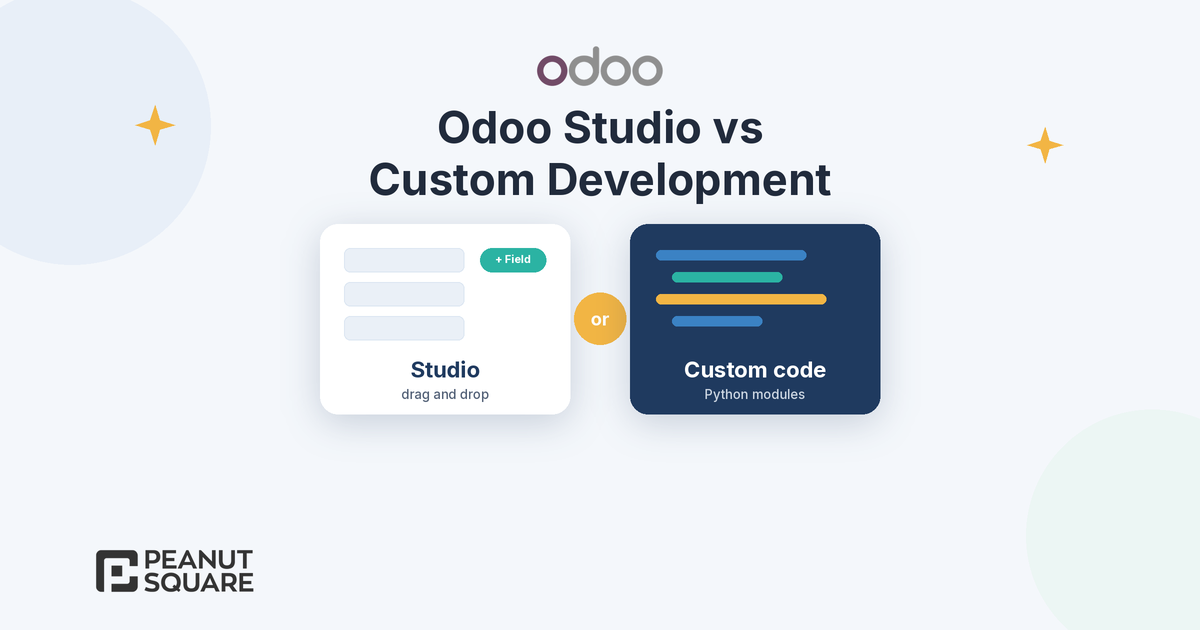
Quick answer: In the Odoo Studio vs custom development choice, use Odoo Studio for new fields, view changes, simple models, automation rules, PDF reports, approval rules and webhooks that a trained business user can look after. Odoo's upgrade service covers Studio customizations as long as Studio stays installed and your subscription is active. Choose custom development, meaning Python modules, when you need complex business logic, deeper integrations or code that should live in version control and be tested. Many companies use both: Studio for light changes and a few well-built modules for the rest.
What Odoo Studio does well
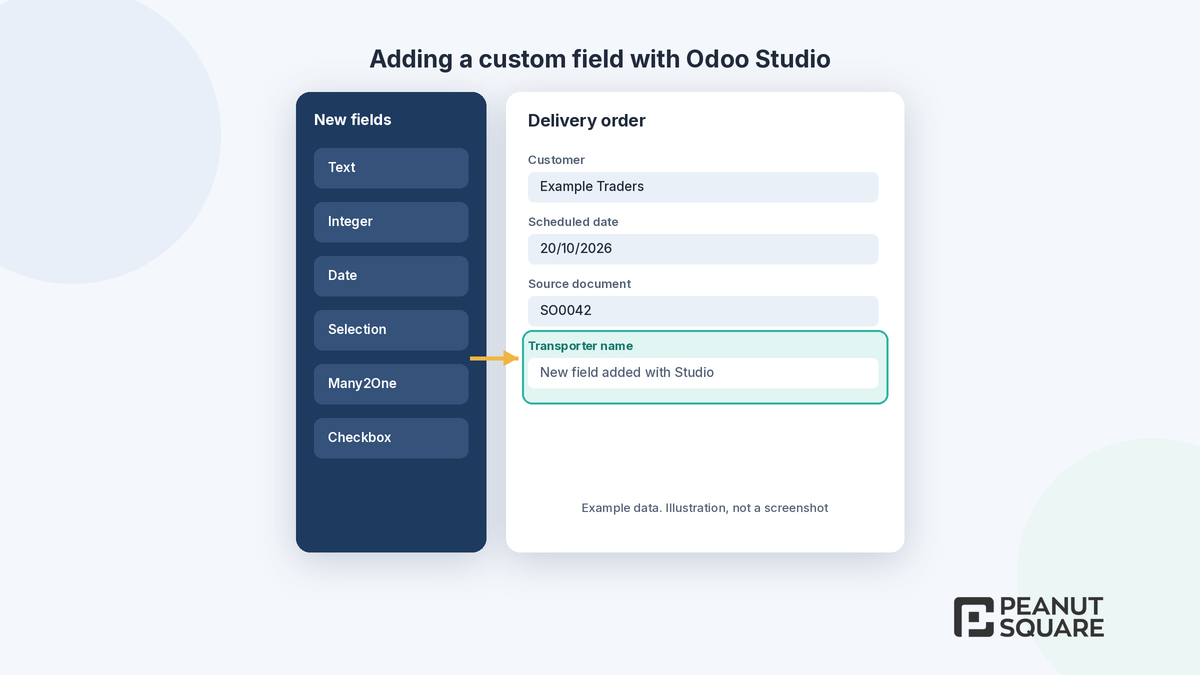
Odoo's Studio documentation describes it as a toolbox to customize Odoo without coding knowledge. In any app you can add or modify fields, views, models, automation rules, webhooks, PDF reports, approval rules and security rules. You open it with the Toggle Studio icon from the screen you want to change.
In practice, Studio is the right tool for changes like these:
Extra fields: a transporter name on deliveries, a site location on leads or a batch reference on a product.
View changes: reordering a form, hiding fields a team never uses or adding a column to a list.
Simple apps: a small register such as machine visits or sample requests, built from Studio's ready-made features like contact details, pipeline stages, tags and chatter.
Automation rules: assign a salesperson, send an email or update a field when a record changes.
Documents and approvals: edit a PDF report layout or require an approval before a step.
Every Studio change is stored in a module called studio_customization, which you can export as a ZIP file and import into another database, according to Odoo's models, modules and apps page.
Limits of Studio
Studio is powerful, but it has edges you should know before you rely on it for core processes:
Plan cost: Odoo's documentation warns that installing Studio on the Standard pricing plan automatically triggers an upsell to the Custom plan. Odoo's pricing page lists Studio, custom developments and the external API under the Custom plan.
Code inside Studio is still code: automation rules can run Python through the Execute Code action, and Odoo's automation rules documentation notes that maintenance of custom code is not included in the Standard or Custom plans and costs extra.
Webhooks need care: the same page recommends involving a developer or solution architect, because badly configured webhooks can disrupt the database and take time to revert.
Moving customizations: before importing a Studio export, the destination database must be on the same Odoo version with the same apps, because Studio does not add the underlying modules as dependencies.
Change control: Studio edits are made in the database itself rather than in a code repository with review and automated tests. For a few fields that is fine; for dozens of interlinked rules, it becomes hard to see who changed what and why.
When is custom code better than Studio?
Custom development means writing an Odoo module in Python and XML, following Odoo's developer documentation. It is the better choice when:
The logic is complex: pricing, commission, costing or planning rules with many conditions, calculations across several models or heavy batch processing.
You integrate other systems: two-way sync with a legacy ERP, a dealer portal, a machine or a marketplace, with error handling and retries.
You change standard behaviour: overriding how a standard Odoo flow works, not just adding fields to it.
You need control and testing: the change is business-critical and should sit in version control, go through review and be tested before release.
You want to reuse it: the same feature is needed across several databases or companies.
Hosting is part of the decision. Odoo's pricing page says Odoo Online hosts databases without custom modules, and that custom modules need Odoo.sh or on-premise hosting on the Custom plan. Odoo.sh hosting for custom developments and the maintenance of custom code are not included in Odoo's plans. For more detail on when to build a module, read our guide to Odoo custom module development.
Odoo Studio vs custom development at a glance
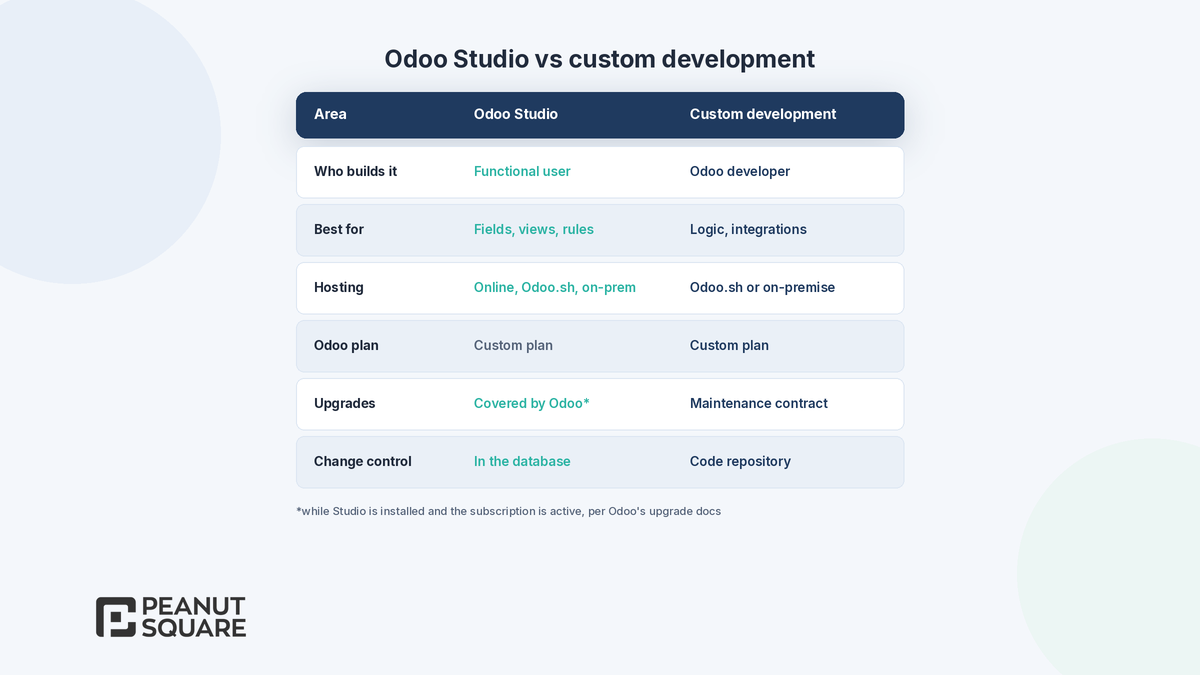
Who builds it: Studio, a trained functional user or consultant; custom development, an Odoo developer.
Best for: Studio, fields, views, simple models, reports and rules; custom development, complex logic, integrations and changes to standard flows.
Hosting: Studio works on Odoo Online, Odoo.sh and on-premise; custom modules need Odoo.sh or on-premise.
Odoo plan: both sit on the Custom plan.
Upgrades: Studio customizations are covered by Odoo's upgrade service while Studio is installed and the subscription is active; custom modules are covered only with a maintenance of customizations subscription, otherwise your developer upgrades them.
Change control: Studio changes live in the database and can be exported; custom code lives in a repository with review and tests.
Upgrade considerations
Upgrades are where the two paths differ most. Odoo's upgrade documentation says its upgrade services cover standard apps, all customizations created with Studio (as long as Studio is still installed and the subscription is active) and developments covered by a maintenance of customizations subscription. They do not cover modules created in-house or by third parties, including Odoo partners, without a maintenance contract.
The same page states that a database with custom modules cannot be upgraded until a version of those modules exists for the target Odoo version. Odoo's guide to upgrading a customized database recommends challenging each customization against new standard features before porting it. Odoo 20 is a good example: record rules were replaced by a domain on the access right, tracking values moved to in-body tracking and Font Awesome icons gave way to Material Symbols, and each of these can touch custom code. Our Odoo 19 vs Odoo 20 guide lists them.
The lesson is not "avoid code". It is: every custom module is something you will port at each upgrade, so build only the modules that earn their keep, and keep them clean.
A hybrid approach
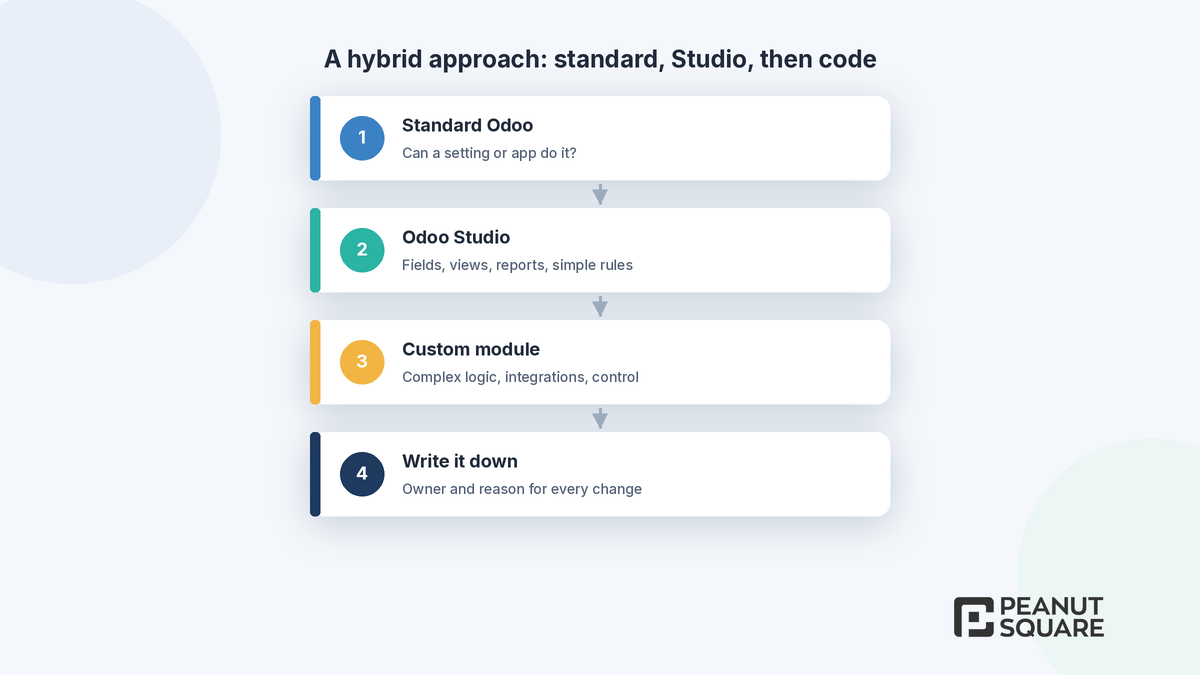
For most growing businesses, Odoo Studio vs custom development is not an either-or choice. A simple order of preference keeps Odoo easy to run and upgrade:
Standard first: check whether a setting or a standard app already does it. Each Odoo release adds features that replace old customizations.
Studio next: use Studio for fields, views, reports and simple rules that a business user can understand.
Code for real gaps: write a custom module when logic, integration or control needs go beyond Studio.
Write it down: keep a short list of every Studio change and module, who owns it and why it exists, and review it before each upgrade.
One caution: avoid having Studio and custom code change the same fields or views, because two sources of change make problems harder to trace.
How Peanut Square can help
Peanut Square is an Odoo Learning Partner based in Ahmedabad, Gujarat, founded in 2017. We have developed 90 Odoo modules and delivered 100+ projects, and our team includes an Odoo-certified consultant. Our Odoo clients include Renite Vitrified (https://renitevitrified.com/), Woodleaf and Madhav Solar. Through our Odoo customization and Odoo development services, we can review your requirements, mark each one as standard, Studio or code, and build the modules you really need. If you are comparing partners, our Odoo partner checklist and our delivery approach explain what to ask.
Not sure whether you need Studio or a developer? Talk to us: https://www.peanutsquare.com/en/contact
About the author: Nishant Patel, CTO, Peanut Square
Nishant leads technology at Peanut Square, an Odoo Learning Partner founded in 2017 and based in Ahmedabad, Gujarat. The team has developed 90 Odoo modules, delivered 100+ projects and includes an Odoo-certified consultant.
Sources
Odoo 20.0 documentation, Studio: https://www.odoo.com/documentation/20.0/applications/studio.html
Odoo 20.0 documentation, Studio models, modules and apps (export and import): https://www.odoo.com/documentation/20.0/applications/studio/models_modules_apps.html
Odoo 20.0 documentation, Studio automation rules: https://www.odoo.com/documentation/20.0/applications/studio/automated_actions.html
Odoo pricing plans and FAQ: https://www.odoo.com/pricing-plan
Odoo 20.0 documentation, Upgrade: https://www.odoo.com/documentation/20.0/administration/upgrade.html
Odoo 20.0 documentation, Upgrade a customized database: https://www.odoo.com/documentation/20.0/developer/howtos/upgrade_custom_db.html
Odoo 20.0 developer documentation: https://www.odoo.com/documentation/20.0/developer.html
Odoo 20 release notes (technical changes): https://www.odoo.com/odoo-20-release-notes
Should I use Odoo Studio or custom development to customise Odoo?
Use Odoo Studio for fields, views, simple models, automation rules, PDF reports, approval rules and webhooks that a trained business user can maintain. Use custom development, meaning Python modules, for complex business logic, deeper integrations, changes to standard Odoo flows or code that must be version-controlled and tested. Many companies combine both.
Does Odoo Studio need a paid plan?
Odoo's Studio documentation says installing Studio on the Standard plan automatically triggers an upsell to the Custom plan. Odoo's pricing page lists Studio, custom developments and the external API under the Custom plan. Its FAQ also says Studio can be chosen as the single app on the One App Free plan.
Are Studio customizations kept when I upgrade Odoo?
Odoo's upgrade documentation says its upgrade services cover all customizations created with Studio, as long as Studio is still installed and the respective subscription is still active. Custom modules are covered only with a maintenance of customizations subscription; otherwise the module's maintainer must upgrade them.
Can I use custom modules on Odoo Online?
Odoo's pricing page describes Odoo Online as hosting databases without custom modules. To develop or use custom modules, it points to Odoo.sh or self-hosting (on-premise) on the Custom plan. Studio customizations work on Odoo Online.
Can Studio customizations be moved to another database?
Yes. Studio stores changes in a module called studio_customization, which you can export as a ZIP file and import into another database. Odoo warns that the destination must be on the same Odoo version with the same apps and modules, because Studio does not add the underlying modules as dependencies.